Quick Answer
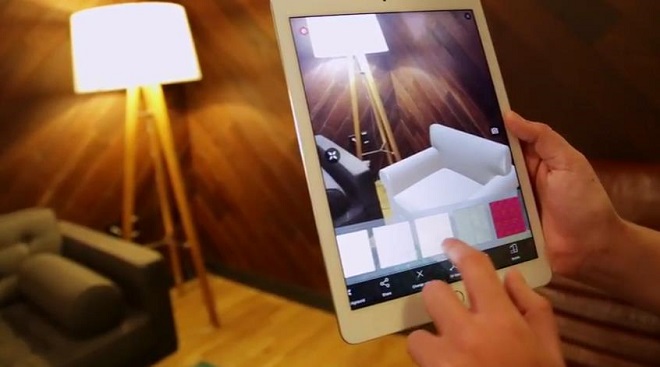
Augmented reality (AR) adds digital elements—like images, text, or animations—on top of the real world through your phone, tablet, or smart glasses. It enhances your view of reality instead of replacing it, making tasks like shopping, learning, or fixing things easier and more interactive.
Key Takeaways
- Start with simple, educational AR apps before trying complex games or tools.
- Always test AR in good lighting to improve tracking accuracy.
- Keep your device updated to ensure best performance and security.
- Visualizing furniture placement before buying (e.g., IKEA Place app)
- Learning anatomy in 3D by viewing interactive human body models
Plain English Explanation
Think of AR as a digital window into your surroundings that shows extra info or visuals in real time. For example, pointing your phone at a furniture store could show how a sofa would look in your living room. Or using an AR app to repair a bike might highlight which bolt to tighten next. It’s not about escaping reality—it’s about making what’s real even smarter and more useful.
Step-by-Step Guides
Set up AR on your smartphone for the first time
- Smartphone with front-facing camera
- AR-compatible app
Step-by-step guide
- 1
Download a trusted AR app from Google Play or Apple App Store (e.g., IKEA Place, Measure, or Pokémon GO).
- 2
Grant permissions for camera, location, and motion access when prompted.
- 3
Open the app in a clear, well-lit space and follow the on-screen setup instructions.
- 4
Test by placing a virtual object and checking if it stays anchored in place.
Common Problems & Solutions
Poor lighting, reflective surfaces, or moving too quickly can confuse the camera and sensors, causing the AR overlay to drift or disappear.
- 1Ensure you're in well-lit, non-reflective areas like a matte wall or plain floor.
- 2Hold your device steady and move slowly when scanning a surface.
- 3Allow time for the app to initialize and lock onto a stable reference point.
- Using AR in bright sunlight or under fluorescent lights that flicker.
- Trying to track on glass, mirrors, or patterned carpets.
Pros & Cons
Pros
- Enhances real-world experiences without isolating users
- Improves learning and decision-making through visual context
- Saves time by previewing changes before taking action (e.g., decorating)
Cons
- Can cause eye strain or disorientation if overused
- Not all environments support accurate AR tracking
- Limited battery life during extended use
Real-Life Applications
Visualizing furniture placement before buying (e.g., IKEA Place app)
Learning anatomy in 3D by viewing interactive human body models
Repairing appliances with step-by-step AR instructions overlaying real components
Navigating airports or large stores via AR wayfinding apps
Playing location-based games like Pokémon GO that blend fantasy with real-world locations
Beginner Tips
- Start with simple, educational AR apps before trying complex games or tools.
- Always test AR in good lighting to improve tracking accuracy.
- Keep your device updated to ensure best performance and security.
- Don’t rely solely on AR for navigation—use it as a helpful supplement.
- Be mindful of your surroundings when using AR, especially outdoors or near traffic.
Frequently Asked Questions
AR adds digital content to the real world (like seeing a floating map on your street), while VR creates a fully artificial environment (you’re inside a game). AR keeps you grounded in reality; VR removes you from it.
Sources & References
- [1]Augmented reality — Wikipedia
Wikipedia, 2026
